Google Shopping Price Checks: 6 Steps Before Repricing
Updated: 20 hours ago
A Google Shopping price tracker is useful only when it tells you more than who has the lowest visible number. For ecommerce teams, the real job is to compare equivalent offers, verify that the observed price is current and buyable, and decide whether a price difference is actually worth acting on.
Shopify itself recommends researching competitor prices as part of market research and monitoring prices over time. Shopify’s product-pricing guidance also frames competitive pricing as one input alongside costs, positioning, and margin.
Need Google Shopping tracking software?

What a Google Shopping price tracker should actually track
A useful tracker starts with offer quality, not volume. Before you compare prices, make sure the listings represent the same product and the same buying conditions. Otherwise, a cheaper competitor can be a different variant, multipack, condition, market, or shipping proposition.
Exact product match: brand, model, GTIN or MPN where available, size, color, pack quantity, and condition.
Current advertised price: the amount a shopper can actually see for the matched offer, with the correct currency.
Availability: whether the competitor product is actually in stock and purchasable in the target market.
Shipping and market context: a lower item price is not automatically a better total offer when delivery terms or regional pricing differ.
Price history: whether the competitor moved once for a promotion or has established a sustained new price level.
Why Google Shopping price data needs verification
Google requires the submitted Merchant Center price to match the price on the product landing page and checkout. Google’s price attribute documentation also explains that price and currency must be consistent for the target country.
That matters when monitoring competitors because a visible listing is part of a larger product-data chain. Regional pricing, sale pricing, structured data, and landing-page changes can create differences that need interpretation. Google also documents regional availability and pricing requirements, including the need for landing pages to render the corresponding regional price.

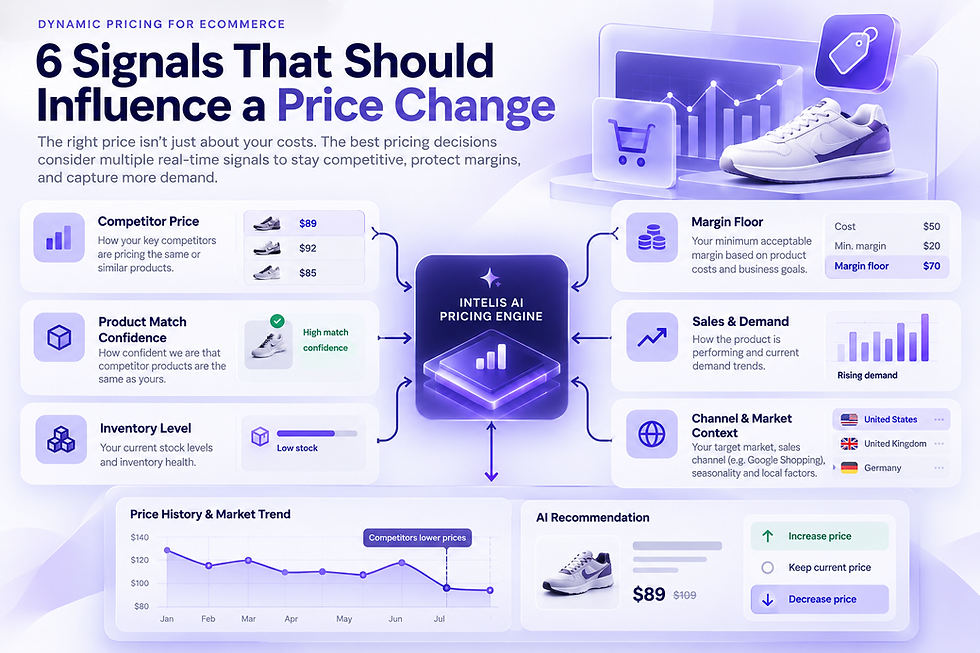
Six checks before you reprice
1. Confirm the product match
A price comparison is only as reliable as the product match behind it. Treat ambiguous matches as review items rather than pricing signals. Variants and bundles are especially important: a two-pack should not drive a decision for a single unit, and a different size or model can invalidate the comparison.
2. Confirm the competitor offer is live
Check availability and the latest observed timestamp. A stale out-of-stock offer should not pull your pricing strategy downward. For fast-moving categories, prioritize fresh exceptions rather than assuming every historical observation still represents the market.
3. Separate regular price from promotions
A short promotion is different from a structural market move. Track whether the price change persists and whether several competitors move together. That context helps you avoid chasing every temporary discount.
4. Compare the full buying context
Compare currency, shipping terms, market, taxes where relevant, and whether the offer is available to the same audience. The goal is not to manufacture a single “market price,” but to understand which competitor offers are genuinely comparable to yours.
5. Review the trend, not only the snapshot
Historical pricing can help distinguish noise from a directional change. If one seller briefly undercuts the market, you may choose to watch. If several comparable sellers establish a lower band, the case for review becomes stronger.
6. Apply your own pricing guardrails
Competitor data should inform a decision, not replace your commercial rules. Margin floors, MAP or RRP constraints, inventory position, campaign economics, and approval rules can all determine whether a competitor move should trigger a price update.
A practical workflow for Shopify teams
For a large Shopify catalog, the goal is to reduce the number of products that need manual attention. Start with a defined product set, match competitors carefully, then surface exceptions such as products priced materially above comparable in-stock offers or products where the market moved sharply since the last review.
Prioritize high-value or high-traffic SKUs first.
Separate unmatched products from pricing exceptions.
Keep a record of the competitor, market, observed price, and observation time.
Use approvals or conservative rules when moving from monitoring to automated repricing.
Review outcomes after a change instead of treating a price update as the end of the process.
If a change in Shopping performance is what triggered the investigation, use our Shopping Ads Monitoring checklist to separate feed, campaign, and competitor-price causes before changing bids or prices.
When should tracking become repricing?
Monitoring and repricing are different layers. Monitoring tells you what changed. Repricing adds rules about when your own price is allowed to change, how far it may move, and what needs approval. A mature workflow keeps those layers explicit so a bad match or temporary offer does not become an automatic price decision.
Intelis supports Google Shopping competitor monitoring, AI-assisted product matching, pricing history, and dynamic pricing workflows. You can review the current capabilities on the Intelis dynamic pricing page and decide whether monitoring-only or automated actions fit your catalog.